SST Architecture
Overview
This page explains SST's main components, how Auth and entities interact, and how generated configuration connects the control plane to secure entity-to-entity communication.
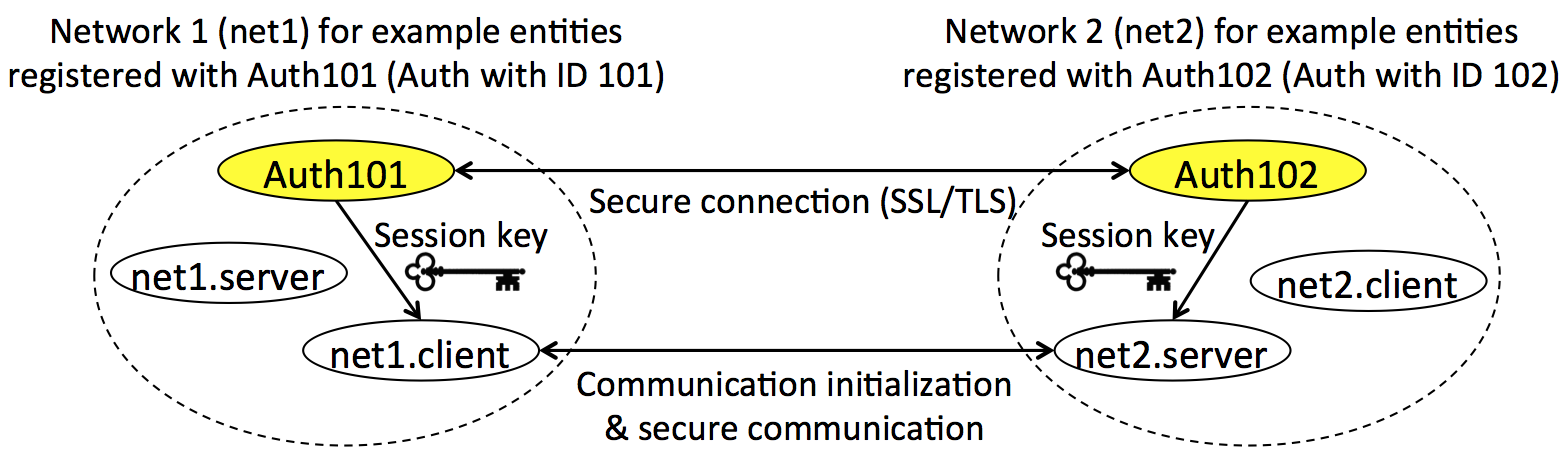
SST uses a locally centralized, globally distributed authorization model. Each local network has an Auth service that knows the registered entities, the communication policy, and the cryptographic material needed to issue session keys. Entities do not invent trust relationships at runtime; they request keys from Auth for communication that is already allowed by policy.
Example deployment
The default examples use two local Auth instances, each with entities registered to its own network. This diagram is from examples/README.md and illustrates the generated Auth/entity layout used by the default graph.
Core components
Auth
Auth is the trusted local service. In this repository it is implemented in Java under auth/.
Auth is responsible for:
- authenticating registered entities;
- checking communication policy;
- issuing symmetric session keys;
- storing registered entities, trusted Auths, communication policies, and cached session keys in SQLite;
- communicating with trusted Auth instances in multi-Auth deployments;
- supporting migration and backup workflows used by advanced deployments.
The Auth server is started from auth/auth-server/ after the example generation step creates properties and databases:
java -jar target/auth-server-jar-with-dependencies.jar -p ../properties/exampleAuth101.properties
Entity
An entity is an application participant: client, server, publisher, subscriber, uploader, downloader, user, agent, or gateway. Entity code lives mostly under entity/.
SST provides entity-side APIs in:
- C, for embedded and native applications;
- C++, for native applications using automatic resource cleanup and a class-based session API;
- Node.js, using accessor-style classes such as
SecureCommClientandSecureCommServer; - Python, for secure clients, servers, and scripts using
IoTAuthContext,SecureClient, andSecureServer, including the secure File System Manager example.
.graph topology file
The .graph file is the source of truth for examples. It describes Auth nodes, entities, Auth-to-Auth trust, entity-to-Auth assignments, cryptographic settings, ports, and optional file sharing policy.
The main generator is:
cd examples
./generateAll.sh -g configs/default.graph
That one input file produces:
- Auth credentials in
auth/credentials/; - entity credentials in
entity/credentials/; - Auth properties in
auth/properties/; - Auth SQLite databases in
auth/databases/; - Node entity configs in
entity/node/example_entities/configs/; - C example configs in the relevant
entity/c/examples/...folders.
Secure communication flow
At a high level, a secure client/server exchange works like this:
- Auth starts with a generated properties file and database.
- A server entity starts and listens for secure communication.
- A client entity loads its runtime config and target server information.
- The client authenticates to Auth and requests session keys for its target group or key ID.
- Auth checks policy and returns session keys.
- The client opens a socket to the server and starts the SST session-key handshake.
- The server validates or requests the matching session key from Auth.
- Both sides enter secure communication state and exchange encrypted messages with sequence validation.
Deployment structure
Think of SST as two layers:
- Key management and trust layer: Deployment configuration (
.graphfiles) defines the topology — registered entities, trust relationships, and access policies — and drives generation of credentials, Auth properties, and Auth databases. Session key requests also flow through this layer. - Secure communication layer: entity-to-entity secure communication using session keys issued by Auth.
Most setup mistakes happen in the key management and trust layer: stale generated files, wrong config paths, wrong Auth properties, missing databases, or ports that do not match the graph. Most application mistakes happen in the secure communication layer: connecting before Auth is running, sending before the secure connection is established, using expired session keys, or using the wrong target server.