IPFS File Sharing
Overview
This page describes the SST IPFS file sharing example, which combines Auth-managed access control with encrypted files stored in IPFS. File content is never stored in Auth — Auth manages only the session keying material used to encrypt and decrypt the file.
Publication: Yeongbin Jo, Yunsang Cho, and Hokeun Kim, "Secure and Lightweight Access Control for Highly Decentralized and Distributed File Systems," in Proc. 1st International Workshop on Middleware for the Computing Continuum (Mid4CC '23), ACM, Bologna, Italy, December 11, 2023. DOI: 10.1145/3631309.3632832
Relevant sources:
- C IPFS helpers:
src/ipfs.hin iotauth/sst-c-api - C++ IPFS API and examples:
cpp/src/ipfs.hppand the C++ IPFS README - C IPFS example:
examples/ipfs_examples/in iotauth/sst-c-api - File sharing graph and scripts:
examples/file_sharing/in iotauth/iotauth
Architecture
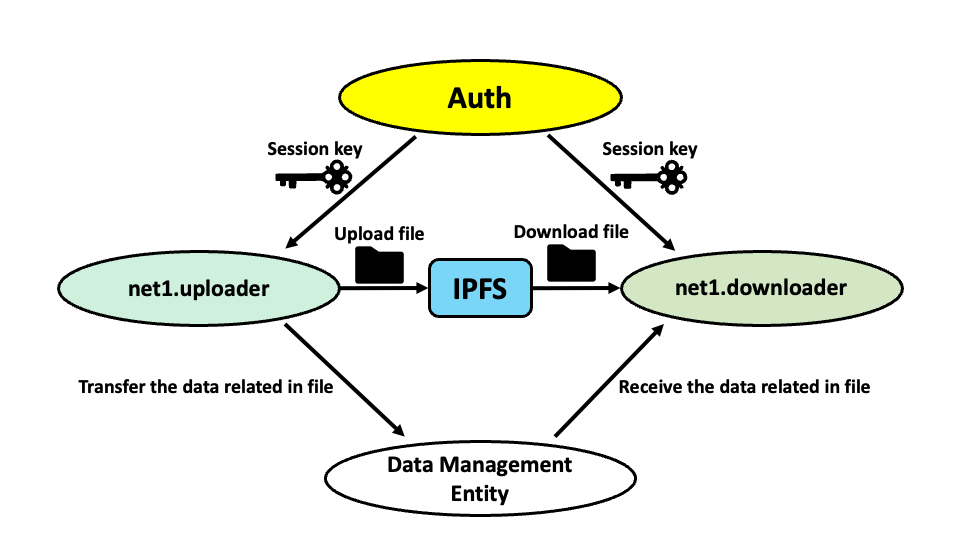
The system consists of four services:
| Service | Role |
|---|---|
| Auth | Issues and manages session keys; handles add-reader requests. |
| IPFS daemon | Stores and serves encrypted file content by content identifier (CID). |
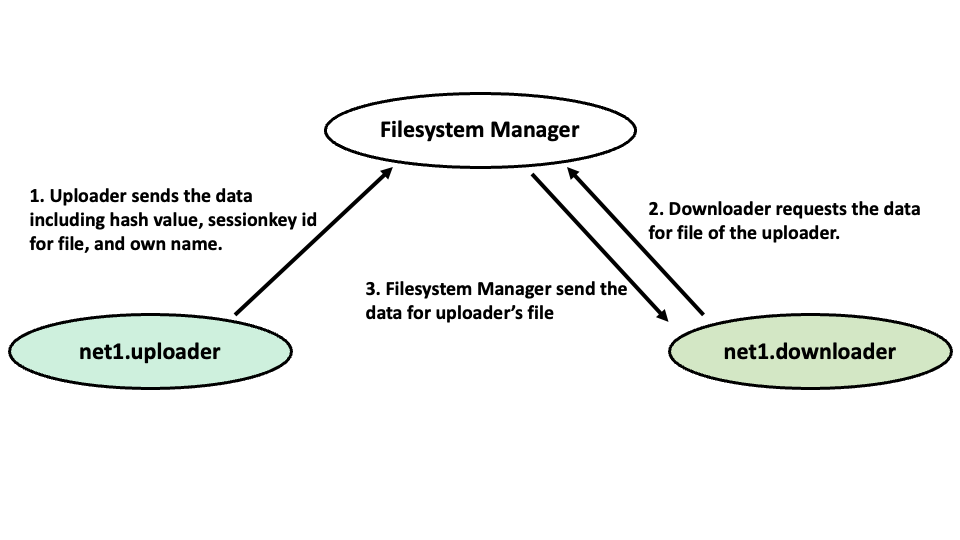
| File System Manager | Stores file metadata (CID, session key ID, purpose); acts as an index between uploader and downloader. |
| Uploader / Downloader | C or C++ entities that encrypt, upload, download, and decrypt files. |
High-level flow
- The uploader encrypts a local file with an SST session key obtained from Auth.
- The encrypted file is added to IPFS via the local CLI (
ipfs add); IPFS returns a content identifier (CID). - The uploader registers the CID and session key ID with the File System Manager.
- The uploader sends an add-reader request to Auth, authorizing specific readers to obtain the session key.
- A downloader queries the File System Manager for the CID and session key ID.
- The downloader requests the session key from Auth (Auth verifies the reader has been authorized).
- The downloader fetches the encrypted file from IPFS and decrypts it.
File System Manager role
The File System Manager bridges the IPFS content layer and the SST key layer. It stores:
- the IPFS CID of the encrypted file;
- the session key ID used to encrypt it;
- the purpose string so downloaders can request the right key.
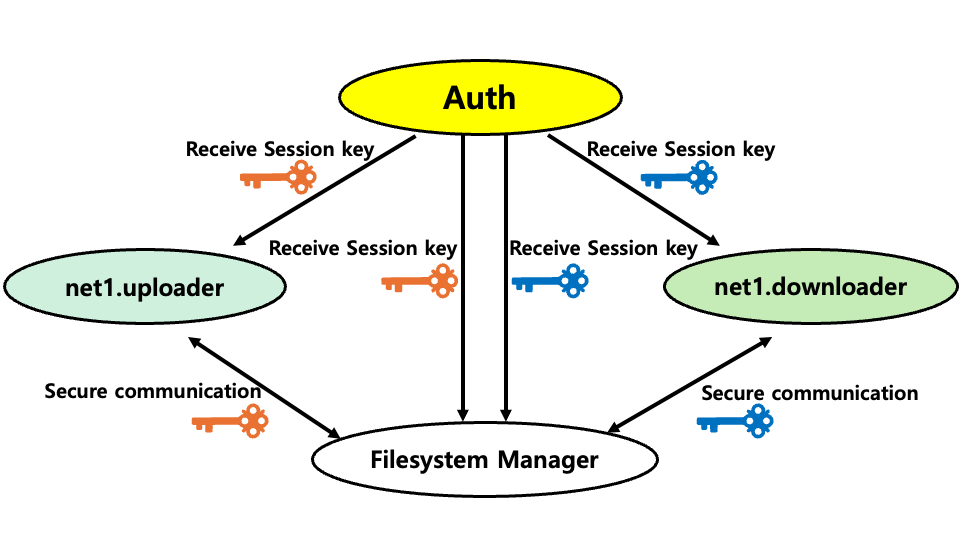
A secure variant of the File System Manager protects its own metadata with SST session keys:
Prerequisites
- Auth is running with the file sharing policy.
- IPFS CLI is installed and the IPFS daemon is running.
- The File System Manager is running.
- The sst-c-api library is built (see C Guide).
Install IPFS:
# macOS
brew install ipfs

# Ubuntu
snap install ipfs
Initialize and start the IPFS daemon:
ipfs init
ipfs daemon
Generate file sharing configs
cd examples    # inside iotauth/iotauth
./cleanAll.sh
./generateAll.sh -g configs/file_sharing.graph
This creates Auth databases, credentials, and entity configs for the file sharing topology.
Build the example
cd entity/c/examples/ipfs_examples/c    # inside iotauth/iotauth
cmake -S . -B build
cmake --build build
This source build does not require a system-wide library installation. It produces entity_uploader and entity_downloader (and secure variants).
Start the File System Manager
cd examples/file_sharing    # inside iotauth/iotauth
python3 file_system_manager.py
Run the uploader
Create a non-empty plain_text input file in entity/c/examples/ipfs_examples/ before running this command. Run from c/build/ so the checked-in config's relative credential paths resolve correctly.
cd entity/c/examples/ipfs_examples/c/build
./entity_uploader ../../uploader.config ../../plain_text ../../addReader.txt
Arguments:
- Config file path.
- Path to the plaintext file to encrypt and upload.
- Path to a file listing the readers to authorize (one JSON request per line, for example
{"AddReader":"net1.Bob"}).
The uploader:
- Reads
addReader.txtand callssend_add_reader_req_via_TCP()with each JSON request. - Requests session keys from Auth for the file-sharing purpose.
- Calls
file_encrypt_upload()to encrypt the file and upload it withipfs add. - Calls
upload_to_file_system_manager()to register each CID and key ID.
The C uploader exits after registering the encrypted files; it does not wait for a direct connection from the downloader.
Run the downloader
After the uploader has registered the files:
cd entity/c/examples/ipfs_examples/c/build
./entity_downloader ../../downloader.config
The downloader:
- Calls
receive_data_and_download_file()to fetch the CID and key ID from the File System Manager. - Requests the session key from Auth (requires having been authorized by the uploader).
- Downloads the encrypted file from IPFS.
- Calls
file_decrypt_save()to decrypt and save the file locally.
Secure File System Manager
The secure manager uses the current Python API from entity/python/. Install that package in a virtual environment, then run the manager with the environment active:
cd entity/python
python3 -m venv .venv
source .venv/bin/activate
python3 -m pip install -e .
cd ../../examples/file_sharing
python3 secure_file_system_manager.py file_system_manager.config
The manager prompts for its database password. From entity/c/examples/ipfs_examples/c/build/, use secure_entity_uploader with ../../secure_uploader.config, ../../plain_text, and ../../addReader.txt, followed by secure_entity_downloader ../../secure_downloader.config. These entities exchange metadata with the manager over SST secure channels. The Python package provides those channels; the file-sharing application lives separately in examples/file_sharing/.
C IPFS API reference
file_encrypt_upload
int file_encrypt_upload(session_key_t* s_key,
                        SST_ctx_t* ctx,
                        char* my_file_path,
                        unsigned char* hash_value,
                        estimate_time_t* estimate_time);
Encrypts the file at my_file_path using s_key, runs ipfs add on the result, and writes the IPFS CID into hash_value. Returns the CID length on success or -1 on failure.
upload_to_file_system_manager
int upload_to_file_system_manager(session_key_t* s_key,
                                  SST_ctx_t* ctx,
                                  unsigned char* hash_value,
                                  int hash_value_len);
Sends the CID and session key ID to the File System Manager over TCP. Returns 0 on success, -1 on failure.
send_add_reader_req_via_TCP
int send_add_reader_req_via_TCP(SST_ctx_t* ctx, char* add_reader);
Sends an add-reader request to Auth. add_reader contains the serialized request text, such as {"AddReader":"net1.Bob"}. The example program reads these strings from the file passed on its command line. Returns 0 on success, -1 on failure.
receive_data_and_download_file
int receive_data_and_download_file(unsigned char* skey_id_in_str,
                                   SST_ctx_t* ctx,
                                   char* file_name,
                                   estimate_time_t* estimate_time);
Connects to the File System Manager, receives the CID and session key ID, downloads the encrypted file from IPFS via ipfs get, and writes the result to file_name. Returns 0 on success, -1 on failure.
file_decrypt_save
int file_decrypt_save(session_key_t s_key, char* file_name);
Decrypts the downloaded encrypted file using s_key and writes the plaintext to disk. Returns 0 on success, -1 on failure.
Configuration fields
File sharing configs include File System Manager coordinates:
| Field | Example value |
|---|---|
fileSystemManager.ip.address | 127.0.0.1 |
fileSystemManager.port.number | 22100 |
The generated graph, Auth database, entity configs, and File System Manager config must all agree on these values.
Common pitfalls
- IPFS commands fail if the daemon is not running (
ipfs daemon). - The uploader command takes a reader-list file; the
send_add_reader_req_via_TCP()API takes the JSON request text from each line. - File sharing examples require the
file_sharing.graph, not the default graph. - The File System Manager must be running before uploader or downloader entities that contact it.
- Generated file paths are relative to the example working directory; run commands from the correct directories.
Next steps
- See C API Reference for full function documentation.
- See File Block Encryption for offline block-level encryption without IPFS.
- See Server/Client Example for basic secure socket communication.