Troubleshooting
Overview
This page collects the setup and runtime checks that usually resolve local SST example failures, especially stale generated files, wrong working directories, mismatched ports, and missing dependencies.
Most SST setup failures come from generated files, working directories, ports, or stale credentials. Start with the checks below.
Regenerate from a clean example state
When in doubt:
cd examples
./cleanAll.sh
./generateAll.sh
Use a custom graph only after the default example works:
./generateAll.sh -g configs/your.graph
Auth does not start
Check:
- you built from
auth/auth-serverwithmvn clean install; - the properties path is passed with
-p; - the properties file exists, for example
../properties/exampleAuth101.properties; - generated Auth databases exist under
auth/databases/; - no other process is using the configured Auth ports.
Correct command:
java -jar target/auth-server-jar-with-dependencies.jar -p ../properties/exampleAuth101.properties
Auth is ready when it shows:
Enter command (e.g., show re/cp/ta/sk/maps/dp/di, add/remove re/cp/dp...):
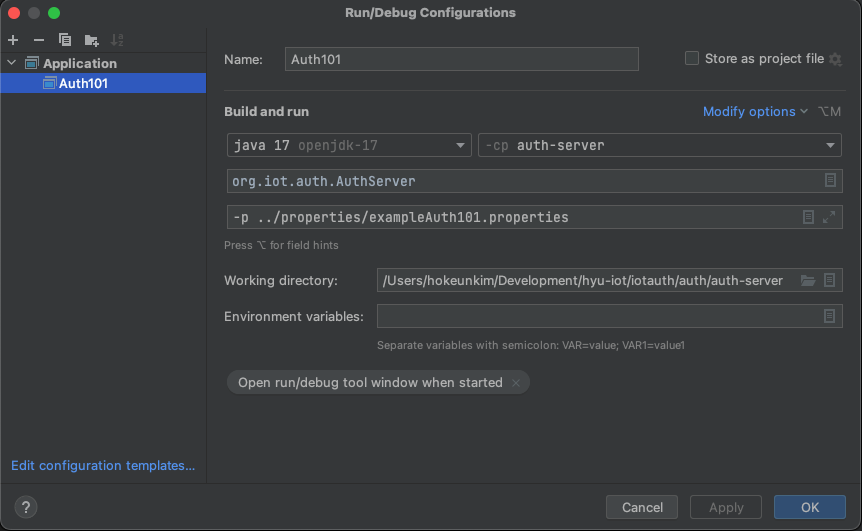
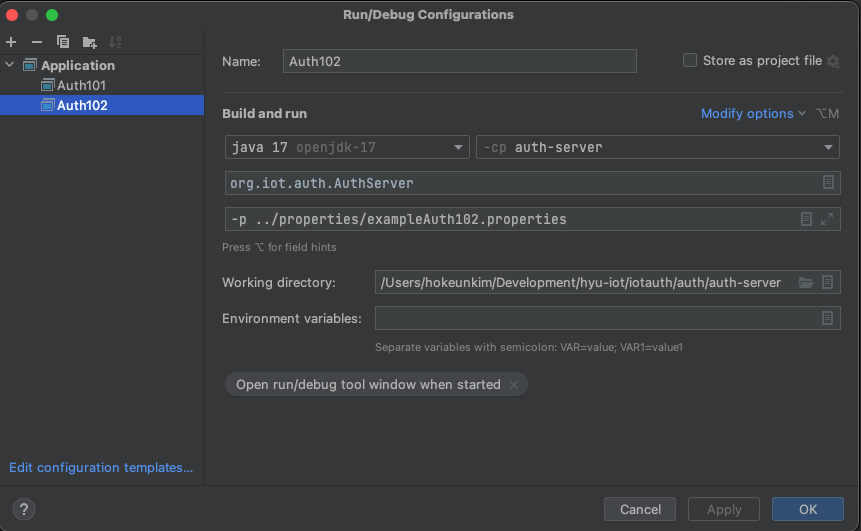
IntelliJ run configuration reference
If you run Auth from IntelliJ instead of the command line, compare your run configuration with the existing screenshots from auth/README.md.
Entity cannot reach Auth
Check the entity config:
- C:
auth.ip.addressandauth.port.number; - Node:
authInfo.hostandauthInfo.port; - graph:
entityHostandtcpPortfor the assigned Auth.
Also check that the entity is assigned to the Auth ID it expects:
- C:
authInfo.id; - Node:
authInfo.id; - graph:
assignments.
Session key request fails
Possible causes:
- Auth is not running.
- Entity credentials were not generated or paths are wrong.
- Entity name in config does not match the Auth database.
- Communication policy does not allow the requested target.
- Client
entityInfo.purposerequests the wrong group or key ID. - Generated files are stale after changing the graph.
Regenerate and restart Auth before debugging deeper.
C example cannot find keys or certificates
C configs use paths relative to the directory where the binary is run. For the server/client example, run from:
entity/c/examples/server_client_example/build
Then use:
./entity_server ../c_server.config
./entity_client ../c_client.config
Node example cannot load modules
Run:
cd entity/node
npm install
or:
./initNodeEntities.sh
The generated example scripts expect to run from:
entity/node/example_entities/
Node example cannot find config
Generated Node configs live under:
entity/node/example_entities/configs/
Use paths like:
node client.js configs/net1/client.config
node server.js configs/net1/server.config
Remember that these are JSON files with a .config extension.
Connection refused or handshake timeout
Check:
- Auth terminal is still running.
- Server entity is running before the client tries to connect.
- Client target port matches server listening port.
- The server's
hostandportin the graph match the generated config. - The port is not already used by another process.
For Node clients, inspect targetServerInfoList in the generated client config. For C clients, inspect entity.server.ip.address and entity.server.port.number.
IPFS example fails
Check:
- IPFS CLI is installed.
- IPFS daemon is running.
- You generated from
configs/file_sharing.graph. - File System Manager is running.
fileSystemManager.ip.addressandfileSystemManager.port.numbermatch across configs.addReader.txtpath is passed where the uploader expects it.